


This article guides you on how to quickly install an eSIM on your Vietnamese iPhone — it only takes 2 minutes, costs from 150,000 VND, and is suitable for all passengers who have just landed at Tan Son Nhat Airport. Upon landing at Tan Son Nhat, the first thing you need is an internet connection. Instead of fumbling around looking for a SIM ejector tool, installing an eSIM on your iPhone only takes 2 minutes and costs from 150,000 VND for an unlimited data package. This solution helps you stay connected right at the arrival terminal, easily book a Grab ride, and avoid expensive roaming charges. If you're still hesitant, read on. comparison
1. What is eSIM and why should passengers at Tan Son Nhat airport use it immediately?
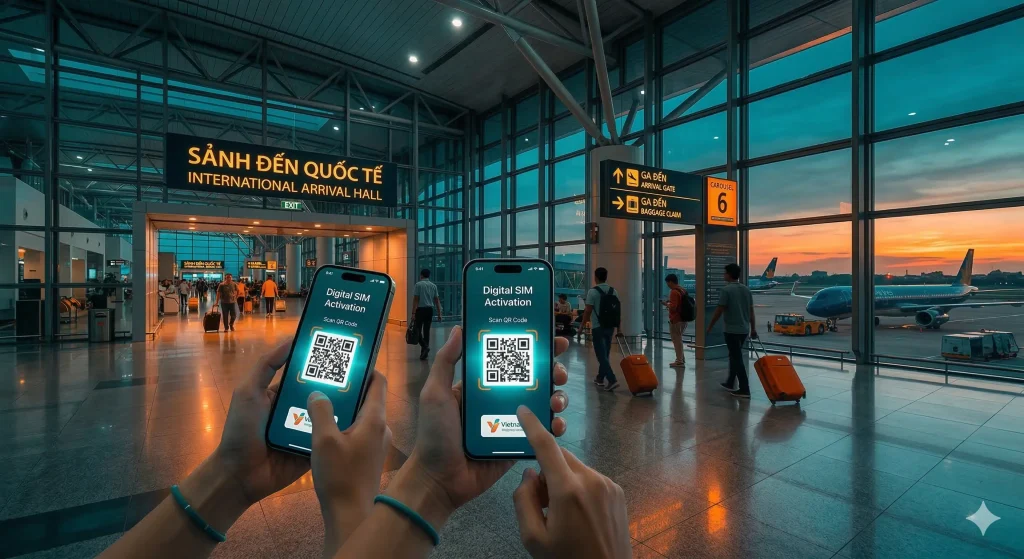
An eSIM is a digital SIM card integrated into the iPhone's circuit board, allowing you to activate mobile plans from Vietnamese carriers without needing a physical SIM card. At Tan Son Nhat Airport, using an eSIM helps passengers skip the wait at traditional SIM card counters and allows them to use both their home country phone number and their Vietnamese domestic number simultaneously on the same device.
In reality, the International Arrivals area is often very crowded during nighttime hours (10 PM - 1 AM). Having an eSIM QR code sent to your email before your flight will give you complete control. I've witnessed many tourists struggling to find a SIM card shop after landing, when all they had to do was turn on their phone, scan the code, and they'd have 5G to call a taxi to District 1.
2. Requirements for your iPhone to be compatible with Vietnamese eSIM
To successfully install eSIM in Vietnam, you need an iPhone from the XS, XS Max, XR series or later (running iOS 12.1 or later) and the device must be an international version (not network locked). In Vietnam, all four major carriers – Viettel, Vinaphone, Mobifone, and Wintel – fully support eSIM with stable 4G/5G speeds around the airport area.
As "insiders," we often advise customers: If you buy an iPhone imported from the US (iPhone 14 and later models), the device will not have a physical SIM slot; you must use an eSIM 100%. Before scanning the code, make sure your iPhone is connected to the airport's free Wi-Fi ("Airport Free Wi-Fi") or the Wi-Fi in business lounges to ensure the authentication process with Apple's servers is not interrupted.
3. Where can I buy an eSIM at Tan Son Nhat International and Domestic Terminals?
You can purchase eSIMs directly at telecommunications service counters in the International Terminal arrival hall (located behind the customs screening area) or Hall A of the Domestic Terminal. The price of a short-term travel eSIM package ranges from VND 150,000 to VND 350,000 depending on data capacity. However, the best way is still to order online through apps like Klook, Airalo, or directly on the carrier's website to receive a QR code via email. The process of setting up an eSIM on a Vietnamese iPhone after receiving the QR code only takes 2-3 minutes.
If you land at the domestic terminal, go to the counters near exits A1 and A2. A tip for business travelers: Don't buy SIM cards from counters without clearly displayed prices. Choose official Viettel or Vinaphone dealers to get assistance with registering the SIM card in your name using your passport/citizen identification card on the spot, ensuring the SIM card won't be blocked after a few days of use.
4. Detailed instructions on how to scan the QR code to set up eSIM on iPhone.
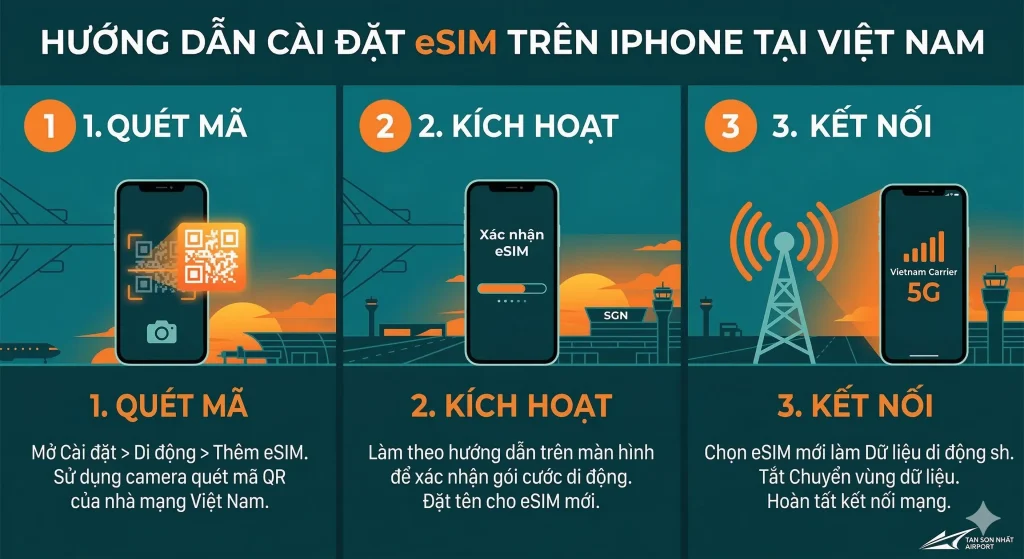
To install, go to Settings news Cellular news Add eSIMNow, please choose Use QR Code Point your camera at the QR code image provided by your carrier. It will take your iPhone approximately 30-60 seconds to "Activate" and display the message "Mobile plan added".
After the scan is complete, the system will ask you to name your SIM label. I recommend naming it "Vietnam" or "Tourism" to distinguish it from your main home SIM. During this process, if your iPhone displays "Unable to complete activation," try turning it off and restarting it, or check if you are in an area with very weak signal (such as in a TCP parking garage).
5. How to set up eSIM as your primary data stream to avoid roaming charges.
After completing the process of installing eSIM on a Vietnamese iPhone, the most important step is to designate the newly installed eSIM as your cellular data source. You can do this by going to... Setting news Mobile news Mobile dataThen, select the new eSIM option. At the same time, turn off the "Allow Cellular Data Switching" feature so that your iPhone doesn't automatically use data from your primary SIM when the eSIM signal is weak.
This is extremely important because if you don't set it up properly, your iPhone could still use a foreign SIM card to access the internet, leading to roaming bills of thousands of dollars overnight. While waiting for your luggage at the conveyor belt, take 30 seconds to double-check this, making sure the "Vietnam" text is displayed in the signal strength indicator at the top of the screen.
6. Troubleshooting common issues: Why isn't my iPhone recognizing the eSIM QR code?
The most common errors are that the QR code has expired or has already been scanned by another device. Additionally, if your iPhone is locked and fixed with an ICCID code, it will reject any additional eSIMs. Another possibility is an unstable airport Wi-Fi connection preventing the device from connecting to Apple's activation server.
If you encounter an error, don't try scanning it more than 5 times as the QR code may be locked. Move to a more open area (near the entrance to the reception area) for better signal reception or ask the SIM counter staff to check your plan status on the system. Sometimes, simply updating to the latest iOS version will resolve the issue.
7. Tips for optimizing 4G/5G signal when traveling from the airport to the city center.
Areas around Tan Son Nhat Airport, such as Truong Son, Cong Hoa, or Hoang Van Thuu streets, are often very congested with vehicles, easily causing local network bottlenecks. For the best speed when booking a Grab, you should go to... Setting news Mobile news Mobile data options news Voice & Data, select 5G On If you are using Viettel/Vinaphone network, to get the best speed after setting up eSIM on your Vietnamese iPhone, follow these tips.
My experience is that as soon as you leave the arrival hall, don't open heavy apps like YouTube. Focus on opening the Maps app or calling a ride first. The signal will be much more stable as the car moves through Hoang Van Thu Park. If you see "LTE" instead of "5G," you can turn Airplane Mode on and off so your iPhone can find the nearest cell tower.
8. Comparing the most popular travel eSIM packages currently available.
| Network provider | Typical packages | Capacity / Day | Reference price | Advantage |
| Viettel | Economic Sim | 5GB/day | 200,000 VND | Strongest signal in remote areas |
| Vinaphone | Big70 | 3GB/day | 150,000 VND | 5G speeds at the airport are incredibly fast. |
| Mobifone | Way2Go | Unlimited | 250,000 VND | Suitable for long-term travelers. |
| Wintel | Win60P | Unlimited | 60,000 VND | Cheapest, uses Vinaphone infrastructure. |
FAQ: Frequently Asked Questions about using eSIM in Vietnam
1. How many eSIMs can I use on an iPhone?
Reply: From iPhone 13 onwards, you can activate two eSIMs simultaneously. Older models allowed you to store multiple eSIMs but only enabled one at a time along with one physical SIM.
2. If I delete my eSIM, can I reinstall it?
Reply: Typically, QR codes can only be used once. If you accidentally select "Cancel mobile plan," you must contact your mobile carrier to obtain a new code (this may incur a fee).
3. Can eSIM be used with social media (Facebook, Zalo, WhatsApp)?
Reply: Absolutely. After installation, the internet on your device will work normally, and you won't need to set up the application account again.
4. Why did I scan the QR code successfully but have no signal?
Reply: Please check the "Data Roaming" option in your eSIM settings. Some travel plans require this setting to be enabled in order to access the internet in Vietnam.
5. Can I buy an eSIM before flying to Vietnam?
Reply: Highly recommended. You can set it up at home, so as soon as the plane lands, you just need to turn on the eSIM and you'll have internet access immediately, without relying on airport Wi-Fi.
Installing an eSIM is the smartest way to start your journey in Saigon smoothly. This guide will help you avoid any confusion when you land at Tan Son Nhat Airport.
Hopefully, this guide helps you connect smoothly. For the best preparation for your trip, you can refer to other tips at TanSonNhatAirport.vn
Please refer to the instructions for more information. Apple's guide on how to install eSIM on iPhone..
